Best overall for reflective entries: Day One. Best for quick iPhone notes: Apple Notes. Best for short Android entries: Google Keep. Best for comparing patterns: Google Sheets. This 2026 guide to the best sleep diary apps focuses on recording your nights—not grading them—and choosing a format you can keep using.
- Day One leads this best sleep diary apps shortlist for dated entries with room for evening context.
- Apple Notes and Google Keep suit brief entries; Google Sheets suits comparing the same fields across nights.
- Restweft offers personal sleep coaching, not a standalone diary app or medical care.
- Choose a manageable format, record estimates, and use your notes to guide small routine adjustments.
Why this matters
A sleep diary gives your observations somewhere to live. Rather than deciding that every difficult night has the same cause, you can record what happened and look back with more context.
The useful question is not which app produces the most information. It is which format helps you notice something you can discuss or adjust without turning bedtime into another task.
Restweft is best for adults who want personal sleep coaching alongside a manageable diary routine. Restweft connects practical evening habits and sleep-pattern tracking with personal guidance and ongoing check-ins. It is everyday wellness coaching, not medical care.
What makes the best sleep diary apps
For this 2026 shortlist, the criteria favor a usable diary over a dashboard full of measurements:
- Easy entry: You can record a night without building an elaborate system.
- Consistent structure: The format lets you repeat useful questions instead of starting over.
- Room for context: You can describe a late work call, a restless evening, or a change in routine.
- Readable history: You can return to previous entries and compare them.
- Manageable detail: You control how much information you record.
- Privacy fit: You can review account, sharing, device-access, and storage settings before entering personal details.
These are general-purpose journaling and note-taking options, not dedicated sleep-measurement apps. That distinction matters: a diary records your account of the night, while a tracker estimates aspects of sleep from device data. Neither should be treated as a diagnosis.
Sleep diary apps at a glance: 2026 picks
| App | Best for | Standout diary use | Key limitation |
|---|---|---|---|
| Day One | Reflective entries | Dated journal entries with room for context | Free-form writing needs a repeated structure for comparison |
| Apple Notes | Quick iPhone entries | A reusable note format in a general notes app | Comparing nights requires your own organization |
| Google Keep | Short Android entries | Brief notes and checklists | Detailed histories become harder to scan across separate notes |
| Google Sheets | Side-by-side pattern review | Rows for nights and columns for consistent fields | Setup and spreadsheet maintenance add work |
The table ranks diary workflows, not sleep accuracy. None of these recommendations depends on a claim that the app measures sleep stages or improves sleep by itself.
1. Day One: best sleep diary app for reflective entries
Day One is a journaling app that supports dated entries. For a sleep diary, that gives you space to describe both the night and the evening around it instead of reducing everything to a score.
Choose this approach if a short narrative feels easier than a spreadsheet. An entry such as worked late, ate afterward, felt alert at bedtime preserves context without requiring you to explain what caused the night.
Day One pros:
- Dated entries give each night's observations a clear place.
- Free-form writing accommodates evenings that do not fit a fixed checklist.
- You can combine a repeated set of prompts with a short personal note.
Day One cons:
- Long entries take more effort to compare than consistent fields.
- Without repeated prompts, you can end up recording different information each morning.
- A journal does not independently verify your sleep estimates.
Best for: Adults who want to understand the circumstances around their nights and prefer writing to tables.
Keep the opening prompts consistent, then leave room for anything unusual. You do not need a polished account of the evening; a plain sentence is enough.
Verdict: Choose Day One if context matters more to you than sorting numbers.
2. Apple Notes: best sleep diary app for quick iPhone entries
Apple Notes is a general note-taking app, not a dedicated sleep diary. You can use a repeated heading and a few prompts to create a straightforward record without designing a separate tracking system.
This fits an evening or morning when you have little attention left. The goal is to leave yourself a useful note, not to complete a lengthy questionnaire.
Apple Notes pros:
- Plain text keeps the entry format flexible.
- Checklists can hold repeated prompts.
- You can keep related entries together using your own note organization.
Apple Notes cons:
- You must create and maintain the diary structure yourself.
- Long running notes can become awkward to review.
- The app does not turn your writing into an explanation of your sleep patterns.
Best for: iPhone users who prefer a brief, familiar notes workflow to a separate journaling habit.
Try one note per week with clearly dated entries, or separate notes if that feels easier to scan. Choose one arrangement and keep it steady long enough to judge whether it works for you.
Verdict: Choose Apple Notes when reducing entry effort is your priority.
3. Google Keep: best sleep diary app for short Android entries
Google Keep supports short notes and checklists. As a sleep diary, it suits quick observations that you want to capture without opening a more elaborate document.
Use a consistent title format and the same prompts each time. Labels can help group your diary notes, but you still decide what information belongs in them.
Google Keep pros:
- Short notes suit brief morning observations.
- Checklists offer a repeatable entry format.
- Labels help separate diary entries from unrelated notes.
Google Keep cons:
- A growing collection of separate notes requires organization.
- Side-by-side comparisons are less direct than in a spreadsheet.
- Very short entries can omit the evening context you later want to understand.
Best for: Android users who want a lightweight place to record a few observations rather than write a journal entry.
Leave space for a sentence about the evening, even if most of the note uses prompts. Stayed up finishing a project tells you something different from went to bed late, without claiming either explains your sleep.
Verdict: Choose Google Keep if a brief note is the format you will actually maintain.
4. Google Sheets: best sleep diary app for comparing patterns
Google Sheets lets you organize nights in rows and repeated questions in columns. That structure makes it easier to review the same observations together rather than search through separate journal entries.
It works best when you enjoy a little organization. Keep a notes column alongside your other fields so the table does not strip away the circumstances of the evening.
Google Sheets pros:
- Consistent columns make repeated observations easier to scan.
- You control the fields and can remove ones that are not useful.
- A notes column can preserve context beside your estimates.
Google Sheets cons:
- Creating a useful layout takes initial effort.
- Entering information into cells can feel cumbersome on a phone.
- Tables can make rough estimates look more precise than they are.
Best for: Adults who prefer structured records and want to compare recurring observations across nights.
Do not add formulas simply because the spreadsheet allows them. Start with information you understand, and avoid turning uncertain estimates into a seemingly exact explanation.
Verdict: Choose Google Sheets if comparison matters more than a journal-style experience.
How these apps were ranked
The 2026 ranking follows the criteria above: entry effort, repeatable structure, room for context, readable history, manageable detail, and privacy fit. Day One is the default for narrative journaling; the other choices serve distinct workflows rather than compete for the same role.
This is a workflow comparison, not a hands-on accuracy study or a clinical evaluation. Before choosing, check the app's current features and account requirements, especially if exporting or sharing your notes matters to you.
Build a diary that fits a busy evening
You do not need to record everything. Start with 3 fields: an approximate bedtime and wake time, how rested you feel, and a brief note about the evening. Add detail only when it serves a question you want to explore.
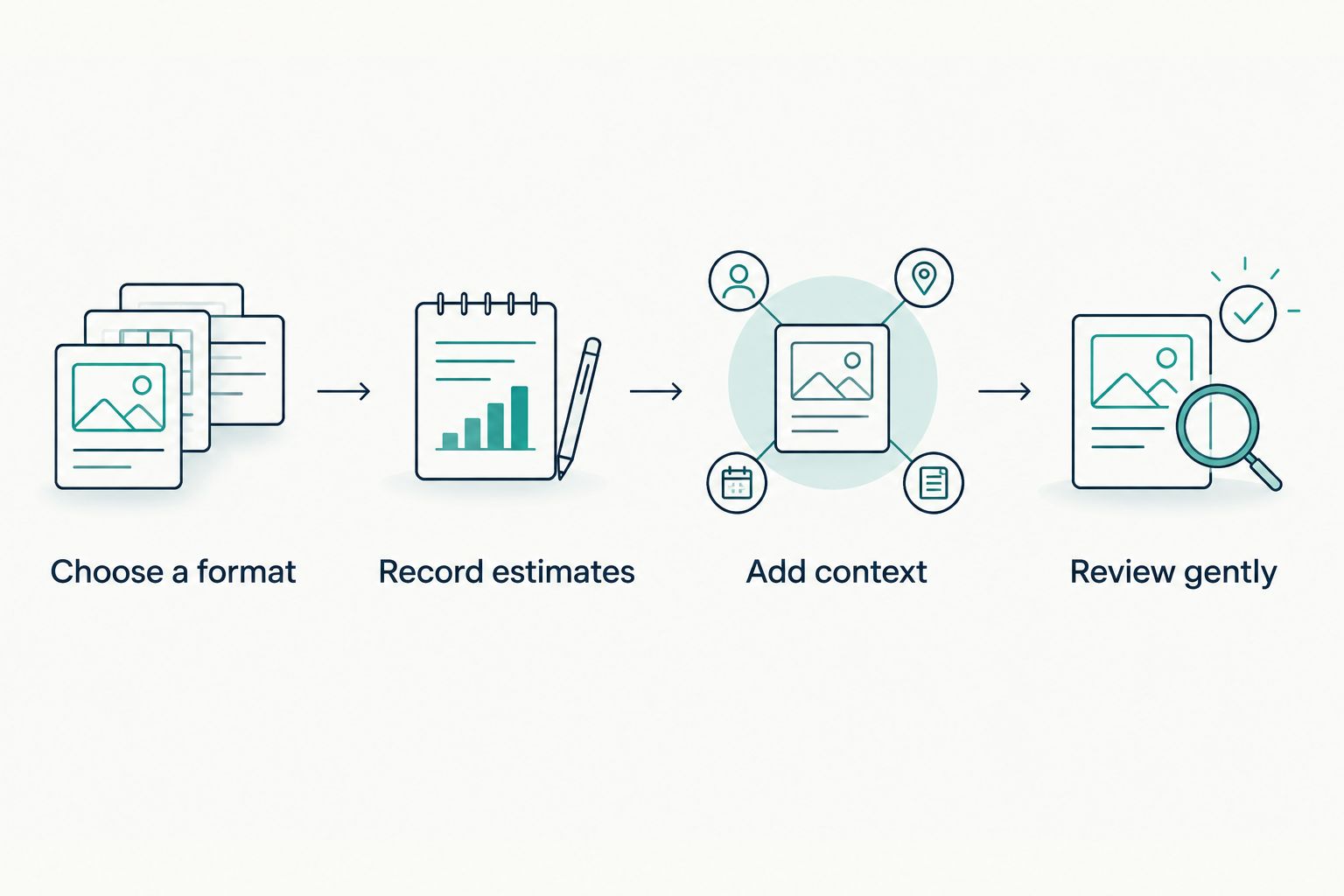
Use this flexible sequence:
- Choose a format: Pick the app that feels easiest to reopen.
- Record estimates: Write what you remember without trying to reconstruct every minute.
- Add context: Note something relevant about the evening, without labeling it the cause.
- Review gently: Look for observations worth discussing or testing through a small routine adjustment.
Set aside 2 minutes for an entry if that boundary helps keep the task manageable. This is a suggested limit, not a requirement or a promise about how long tracking should take.
After 7 days, ask whether the format feels sustainable. That is a usability check—not a deadline for better sleep and not enough evidence to establish what causes a pattern.
If you miss an entry, resume with the next one. Filling gaps from uncertain memories adds work without necessarily giving you better information.
When personal guidance is the better next step
The best sleep diary apps provide somewhere to record information; Restweft provides personal sleep coaching. Those are different kinds of support. A diary can help you bring concrete observations to a conversation, but it does not supply personal guidance by itself.
Restweft combines doable routines with ongoing check-ins for adults who want help fitting adjustments into everyday life. The limitation is equally important: coaching does not diagnose or treat medical conditions and does not replace qualified healthcare advice.
If that support fits what you need, you can create an account and complete a private sleep profile. There is no need to prepare a perfect diary first.
Make room for better nights
Create an account and complete a private sleep profile to begin exploring personal sleep coaching.
Which sleep diary app should you choose?
Choose Day One as the default if you want a dated journal with space for evening context. Choose Apple Notes or Google Keep when a brief entry is more realistic, and Google Sheets when you genuinely prefer comparing structured fields.
For your 2026 routine, start with the format you can maintain on a busy day—not the one that asks for the most information. If recording sleep increases worry or becomes another bedtime obligation, simplify the diary or pause it. Seek qualified healthcare advice for persistent sleep concerns.
FAQ
What's the best sleep diary app in 2026?
Day One is this guide's default for reflective, dated entries with room for evening context. Apple Notes and Google Keep suit shorter entries, while Google Sheets suits structured comparisons.
Can I use Apple Notes as a sleep diary?
Yes, Apple Notes can hold a sleep diary using repeated prompts and dated entries. You create the structure yourself, so keep the questions consistent enough to review later.
Is a sleep diary better than a sleep tracker?
A sleep diary and a sleep tracker serve different purposes. A diary records your observations and context; a tracker estimates aspects of sleep from device data, and neither provides a diagnosis.
What should I write in a sleep diary?
Start with approximate bedtime and wake time, how rested you feel, and a short note about the evening. Use estimates rather than trying to reconstruct every minute, and add fields only when they answer a useful question.
How long should I keep a sleep diary?
There is no single duration required for a personal wellness diary. Try a manageable period, review whether the format is useful, and follow a qualified healthcare professional's instructions if they have requested a specific record.
Can a sleep diary tell me why I sleep badly?
A sleep diary can show observations worth exploring, but it cannot establish a cause or diagnose a condition. Repeated timing or circumstances are a starting point for questions, not proof of an explanation.
Does Restweft replace a sleep diary app?
Restweft offers personal online sleep coaching rather than a standalone sleep diary app. It supports practical evening routines and sleep-pattern tracking through personal guidance and ongoing check-ins, not medical care.
One last thing
Record an evening that felt manageable, not just a difficult one. A diary made only of frustrating nights leaves out examples of what already fits your life.
That gives you a useful question for your next review: What felt doable here? Start there. You are building a rhythm, not pressing a reset button.