Best overall for reviewing sleep patterns: Sleep Cycle. Best for personal guidance: Restweft, an online coaching service rather than an app. Best for adjustable background sound: myNoise. The best sleep apps for shift workers in 2026 depend on whether you need tracking, alarms, or help winding down—not simply a higher sleep score.
- The best sleep apps for shift workers match your actual sleep window, including daytime rest.
- Sleep Cycle is the tracking pick; Sleep as Android is the Android alarm-focused pick.
- Calm suits guided wind-down sessions; myNoise suits adjustable background sound.
- Restweft is best for adults seeking personal sleep coaching and ongoing check-ins, rather than another app.
Why this matters
A rotating schedule changes the question from “What is my bedtime?” to “What can I repeat before my next sleep?” Your routine needs room for an early finish, a late handoff, or daytime responsibilities after an overnight shift.
An app can record a sleep period, sound an alarm, or give you something calming to hear. Those are different jobs. Choose the job first, then choose the app. Adding more features does not resolve a mismatch between your schedule and the routine you are trying to follow.
This 2026 guide compares those jobs separately. It also includes personal coaching for readers who want help adapting a routine, rather than another tool to manage.
What makes the best sleep apps for shift workers?
Use these criteria before committing to an app or service:
- Schedule fit: Check whether the tool accepts daytime sleep and changing sleep windows without pushing you toward a conventional nighttime schedule.
- A clear purpose: Decide whether you need a record, an alarm, guided audio, background sound, or personal guidance.
- Low effort: Choose something you can use when you are tired. A short entry is more practical than a journal you keep postponing.
- Useful feedback: Look for information you can connect to your actual shifts, not just a score without context.
- Comfortable boundaries: Review permissions, recording settings, notifications, and what you are comfortable sharing.
- Honest limits: Tracking and wellness coaching are not medical assessments. Neither replaces qualified healthcare advice.
For a 2026 shortlist, make changing schedules a practical check, not a marketing label. Walk through how you would use each option after your next actual shift.
Best sleep apps and coaching options at a glance
The order below starts with personal support, then separates apps by their main purpose. It is a decision guide, not a claim that coaching and audio apps do the same thing.
| Option | Best for | Standout feature or approach | Key limitation |
|---|---|---|---|
| Restweft | Personal guidance | Online sleep coaching with doable routines and ongoing check-ins | Not a standalone sleep app or medical care |
| Sleep Cycle | Reviewing sleep patterns | Sleep tracking and a smart alarm | Tracking needs context from your work schedule |
| Sleep as Android | Android alarm-focused routines | Sleep tracking and configurable alarm tools | Android-focused; setup needs attention |
| Calm | Guided wind-down | Guided meditations and Sleep Stories | Listening does not explain your sleep patterns |
| myNoise | Adjustable background sound | Customizable sound generators | Sound does not provide personal routine guidance |
1. Restweft: best sleep support for personal guidance
Restweft offers personal online sleep coaching for adults in the United States. The focus is practical routines, sleep-pattern tracking, and ongoing check-ins—not diagnosing or treating a sleep condition.
For shift workers, the reason to consider coaching is the conversation around your routine. You can bring the practical difficulty: getting home mentally busy, sharing a home with people on another schedule, or finding that yesterday's routine does not fit today's shift. The starting point is the life you actually live.
Pros:
- Personal guidance instead of relying only on app feedback.
- An emphasis on doable routines rather than perfection.
- Ongoing check-ins to discuss how your routine fits.
Cons:
- Not a standalone app for alarms or background audio.
- Not medical care or a replacement for healthcare advice.
Best for: Adults who want someone to help them think through manageable adjustments.
Verdict: Choose personal coaching when adapting the routine is harder than finding another tool.
2. Sleep Cycle: best sleep app for reviewing patterns
Sleep Cycle provides sleep tracking and a smart alarm. Its role in this guide is helping you review recorded sleep information, rather than supplying a complete shift-work plan.
Pair that information with a plain note about your shift. A sleep record becomes more useful when you can distinguish an overnight shift from a day off, or an interrupted daytime rest from an ordinary night. Treat the record as a conversation starter, not a verdict on your effort.
Sleep Cycle pros:
- Combines sleep tracking with an alarm function.
- Gives you a record to review across sleep periods.
- Suits readers who prefer recording information to writing a detailed journal.
Sleep Cycle cons:
- A sleep record does not explain every reason you feel tired.
- Shift context still needs your attention; a score is not a work schedule.
Before choosing Sleep Cycle in 2026, check how its current version handles your intended daytime sleep window, device setup, and alarm needs. Review permissions before using any recording-related function.
Best for: Shift workers who want to review patterns and can add context about their workdays.
Verdict: Choose Sleep Cycle for tracking; skip it if another sleep score would become another source of pressure.
3. Sleep as Android: best sleep app for Android alarm routines
Sleep as Android combines sleep tracking with configurable alarm tools on Android. It belongs on your shortlist when the alarm setup is the main feature you want to manage.
Think about your next shift, not an ideal week. Check the wake time, enabled days, volume, and any alarm behavior you intend to use. A carefully configured alarm is more relevant than a long feature list you have not explored.
Sleep as Android pros:
- Brings tracking and alarm tools into the same app.
- Offers configuration for readers who want control over alarm behavior.
- Provides an Android-focused option for this shortlist.
Sleep as Android cons:
- Not the choice for someone seeking an iPhone app.
- Configuration adds decisions when you want a simple setup.
Do your setup while you are alert, rather than immediately before sleeping after a demanding shift. Do not assume an alarm remains appropriate after your work schedule changes.
Best for: Android users who want to configure alarms around their intended sleep periods.
Verdict: Choose Sleep as Android if alarm control is your priority; skip it if you want minimal setup.
4. Calm: best sleep app for a guided wind-down
Calm offers guided meditations and Sleep Stories. Here, it serves as an audio-led transition between finishing your responsibilities and trying to rest.
A guided session gives you something specific to do when “just relax” feels too vague. Use it as an optional part of your routine, not another task you must finish correctly. You do not need to turn every sleep period into a meditation project.
Calm pros:
- Offers spoken guidance for a wind-down session.
- Provides Sleep Stories as an alternative listening format.
- Gives you an activity that does not require journaling.
Calm cons:
- Spoken audio is not comfortable or helpful for everyone.
- Listening does not provide personal feedback about your shift schedule.
For your 2026 routine, choose a session before you settle down. Browsing for the perfect recording can turn a simple step into another decision.
Best for: Adults who prefer being guided through a quiet activity before sleep.
Verdict: Choose Calm for guided listening; skip it if voices keep your attention engaged.
5. myNoise: best sleep app for adjustable background sound
myNoise offers customizable sound generators. Its place in this guide is straightforward: background sound for readers who would rather listen without following a story or spoken instructions.
Use sound as an environmental preference, not a promise of sleep. Choose a comfortable level and notice whether you actually prefer the room with it on. More sound is not automatically more useful.
myNoise pros:
- Offers adjustable sound rather than a fixed spoken session.
- Suits readers who do not want guided narration.
- Gives background listening a separate role from tracking.
myNoise cons:
- Does not provide personal guidance about your routine.
- Adds little if you prefer quiet or find continuous audio distracting.
Check that background audio does not interfere with alarms or important sounds you need to hear. Shared bedrooms also call for a conversation about what works for everyone using the space.
Best for: Shift workers who prefer adjustable, nonverbal background sound.
Verdict: Choose myNoise for sound customization; skip it if silence is more comfortable.
How these options are ranked
The ranking follows the criteria above: purpose, schedule fit, effort, useful feedback, privacy boundaries, and limits. Each recommendation owns a different role; no app receives credit for providing personal coaching simply because it records sleep.
This is a feature-and-fit comparison, not a clinical ranking or a promise of better sleep. The useful question is whether an option helps you carry out a manageable routine without adding unnecessary work.
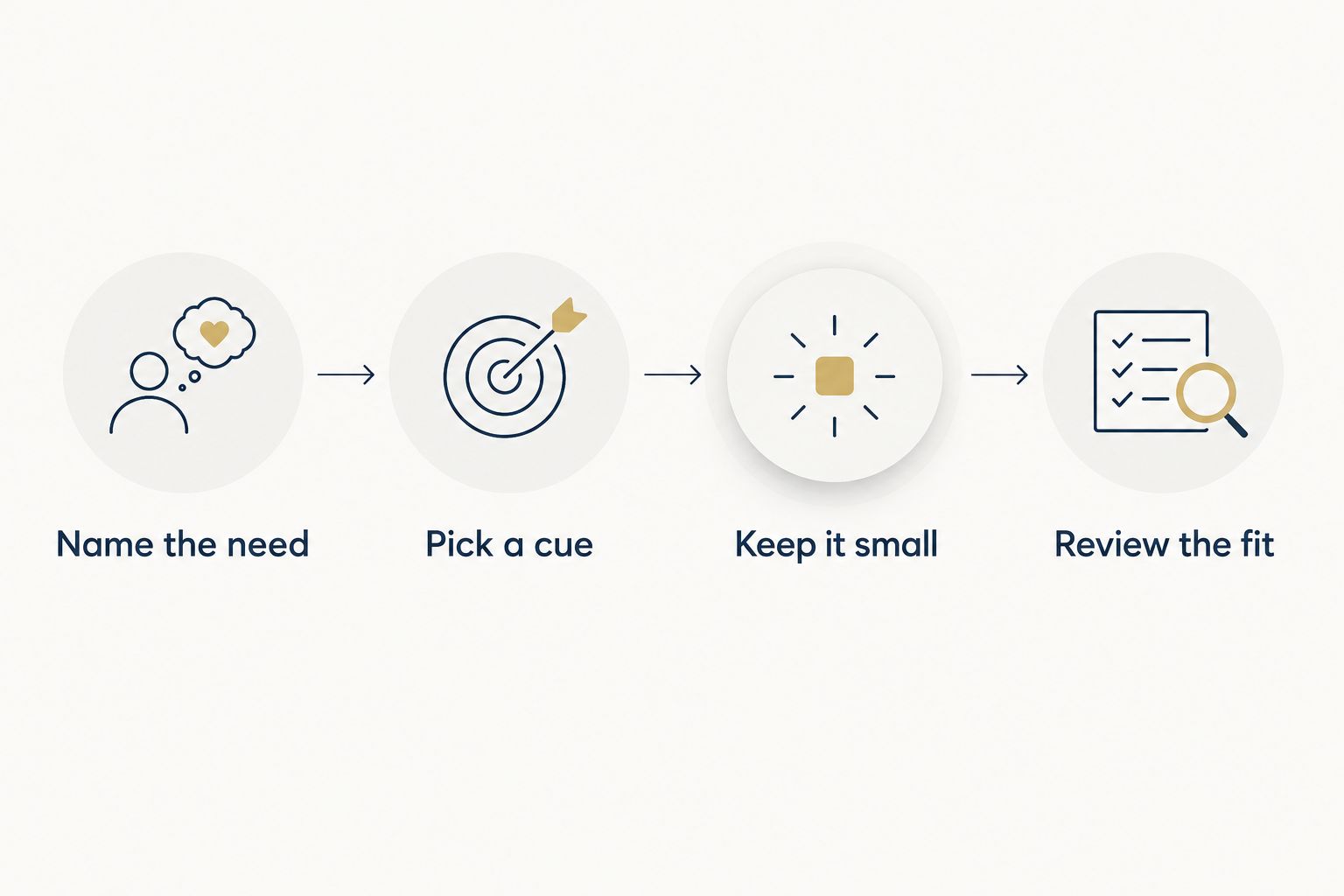
Fit the tool to your next shift
Start small. These suggested durations are planning examples, not sleep requirements or targets you need to meet.
Name the need
Write a single sentence about the sticking point: “I keep changing my alarm,” “I want to notice patterns,” or “I struggle to stop doing things after work.” Choose the option that addresses that sentence.
Avoid beginning with several apps. You want to understand whether one tool is useful before adding more decisions.
Pick a cue
Choose an ordinary event that already happens before your intended sleep: putting away your work bag, finishing a shower, or closing the curtains. Let that event mark the start of your wind-down, even when the clock time changes.
The cue is a rhythm, not a reset button. A disrupted day does not erase it.
Keep it small
Try a 10-minute wind-down if that feels manageable. You might prepare the room, check your alarm, and choose a quiet activity; there is no need to fill every minute.
On a crowded day, a 2-minute version can simply mean checking the alarm and putting the phone aside. This is an example of reducing the task, not a claim about how quickly you will fall asleep.
Review the fit
After waking, make a 30-second note about what felt practical and what got in the way. A sleep journal template can give that note a consistent shape without requiring detailed scoring.
Ask whether the tool made your routine easier to carry out. If you spent more time managing it than using it, simplify the setup.
Which option should you choose in 2026?
Choose Sleep Cycle if your main goal is reviewing sleep patterns. Choose Sleep as Android for Android alarm configuration, Calm for spoken wind-down sessions, or myNoise for adjustable background audio.
Choose Restweft when the harder question is how to build a doable routine around your responsibilities. You can create an account and complete a private sleep profile as a gentle starting point for personal guidance. There is no need to arrive with a perfect schedule.
Keep the boundary clear: everyday wellness tools do not diagnose or treat medical conditions. Speak with a qualified healthcare professional about persistent sleep difficulties or sleepiness that affects safety. Do not drive when sleepy.
FAQ
What's the best sleep app for shift workers in 2026?
Sleep Cycle is this guide's pick for reviewing sleep patterns. Choose Sleep as Android for Android alarm configuration, Calm for guided listening, or myNoise for adjustable background sound instead if those needs matter more.
Can I use a sleep app when I sleep during the day?
Check the app's current settings for your intended daytime sleep window before choosing it. Walk through tracking, alarm times, and reminders rather than assuming a nighttime setup will fit.
Is sleep coaching better than a sleep app?
Sleep coaching and sleep apps serve different purposes. Restweft offers personal guidance and ongoing check-ins, while the apps in this guide focus on tracking, alarms, or audio; coaching is not medical care.
Do I need a sleep tracker and a meditation app?
You do not need both to start a routine. Choose the tool that addresses your main difficulty, then consider another only if it has a clear, separate purpose.
What should I record when my shifts keep changing?
Record your intended sleep period, the shift you worked, and a brief note about interruptions or routine changes. Keep the entry short enough that you are willing to repeat it.
What if sleep scores make me anxious?
Set the scores aside and use a simpler routine or brief journal instead. A wellness tool should support your routine, not become another standard you feel pressured to meet.
Can a sleep app treat problems caused by shift work?
A sleep app is not a substitute for medical assessment or treatment. Ask a qualified healthcare professional about persistent sleep difficulties, especially when sleepiness affects driving or work safety.
One last thing
Your most useful setting might be the reminder you turn off. If an app keeps prompting you during work or during your intended sleep, adjust its notifications before adding another feature.
Make room for better nights by reducing friction—not by collecting more scores. Keep the part that fits your life, and leave the rest.