Best for personal guidance: Restweft. Best for bedtime reminders: Apple Reminders. Best for a simple checklist: Google Keep. This 2026 guide to the best bedtime routine apps for adults also covers Apple Notes for journaling and Google Clock for a clear stopping cue—without treating any tool as a quick fix.
- Among the best bedtime routine apps for adults, Apple Reminders suits a clear evening cue.
- Restweft offers personal sleep coaching for adults who want guidance and ongoing check-ins, rather than another self-guided app.
- Google Keep suits bedtime checklists; Apple Notes suits a simple sleep journal.
- Google Clock suits a stopping cue, but alarms do not provide personal guidance.
- Choose a manageable wind-down routine, not a perfect streak. These options do not replace medical care.
Why this matters
A reminder, checklist, and coaching conversation solve different problems. If you know what you want to do but forget to begin, a reminder fits; if you keep changing your plan because evenings rarely cooperate, personal guidance addresses a different need.
The best bedtime tool is the one that supports your next manageable action. Before adding another app in 2026, decide whether you need a cue, a place to organize your routine, a record of your evenings, or help adapting the plan.
For a practical starting point, use this wind-down routine for a busy evening. Keep the routine small enough to use after dinner runs late, work spills over, or family plans change.
What makes the best bedtime routine apps for adults?
These criteria keep the comparison focused on everyday use rather than a long feature list:
- Clear purpose: The tool should solve a specific problem, such as remembering to start or recording what happened.
- Low evening effort: Opening the tool should lead to an action, not another organizing project.
- Room to adapt: A useful routine needs a shorter version for busy evenings.
- Useful reflection: Notes should help you describe your evening, not turn sleep into a performance score.
- Appropriate support: Reminders and journals are self-guided tools. Personal coaching adds conversation and check-ins.
- Honest limits: None of these options diagnoses sleep conditions or replaces qualified healthcare advice.
You do not need every function. Pick the smallest amount of support that matches the difficulty you actually face.
Bedtime routine options at a glance
| Option | Best for | Standout function | Key limitation |
|---|---|---|---|
| Restweft | Personal guidance | Online sleep coaching with ongoing check-ins | Not a standalone reminder app or medical care |
| Apple Reminders | Remembering to begin | Scheduled reminders for a chosen action | A notification cannot help you rethink the routine |
| Google Keep | A short evening checklist | Checkboxes and editable notes | You design and maintain the plan yourself |
| Apple Notes | Written evening reflection | A flexible place for journal entries | An ordinary note does not interpret sleep patterns |
| Google Clock | A clear stopping cue | Alarms and timers | A sound signals a transition but does not create one |
This 2026 ranking separates options by purpose. The coaching service comes first for readers who want support; the apps that follow each have a distinct self-guided role.
1. Restweft: best for personal bedtime routine guidance
Restweft is best for adults who want personal sleep coaching, practical evening routines, and ongoing check-ins. It is an online coaching service, not a bedtime reminder app, and its role is everyday wellness support rather than medical care.
That distinction matters when your difficulty is adapting a routine, not finding another place to write one. Personal guidance gives you a way to discuss what fits the life you actually live, without pressure to be perfect.
Coaching pros:
- Personal guidance rather than only self-directed prompts.
- Support for building practical evening routines.
- Ongoing check-ins and attention to sleep patterns.
Coaching cons:
- Requires your participation in conversations and reflection.
- Not a substitute for a simple alarm or checklist.
- Does not diagnose or treat medical conditions.
Best for: Adults who want help adjusting their routine around real evenings.
Verdict: Choose coaching when the plan needs personal guidance, not just another notification.
2. Apple Reminders: best for remembering to start
Apple Reminders lets you create tasks and schedule reminders. For a bedtime routine, its clearest role is prompting an action you have already chosen, such as putting work away or preparing what you need for tomorrow.
Keep the wording concrete. A reminder to put the work bag by the door gives you something to do; a reminder to sleep better asks for an outcome you cannot simply check off.
Apple Reminders pros:
- Scheduled prompts support a chosen starting cue.
- Task names can describe specific actions.
- Lists keep evening tasks together.
Apple Reminders cons:
- You must decide what the routine includes.
- A dismissed prompt does not explain what got in the way.
- It offers no personal coaching conversation.
Best for: Adults who already have a workable routine but forget to begin.
For a 2026 routine, start with one useful prompt rather than a sequence of alerts. Add another only if it serves a separate purpose.
Verdict: Choose Apple Reminders for a clear cue; skip it as your main solution when you need help shaping the routine.
3. Google Keep: best for a short bedtime checklist
Google Keep supports notes and checklists. Use it to hold a few evening actions in one place, especially when keeping track of those actions is the main difficulty.
A checklist might include preparing tomorrow's essentials, putting work materials away, and choosing something quiet to do. Those are examples, not required steps; your list should reflect your own evening.
Google Keep pros:
- Checkboxes make the chosen actions easy to see.
- Editable notes let you revise the routine.
- A short list can hold both a regular plan and a shorter alternative.
Google Keep cons:
- You create the plan without personal guidance.
- A completed checklist does not measure sleep quality.
- Adding tasks can turn a simple routine into more evening work.
Best for: Adults who want a visible plan without a separate sleep-focused system.
Treat unfinished boxes as information. If the same task keeps getting left behind, consider changing the task instead of making the list longer.
Verdict: Choose Google Keep when organization is the problem; skip the long checklist.
4. Apple Notes: best for a simple evening journal
Apple Notes provides a flexible place to write about your evening and the following morning. A brief journal can help you describe what happened without assigning your night a grade.
Use plain observations: work ended late, dinner shifted, you felt alert, or the evening felt rushed. Keep observations separate from explanations; a note about one night does not establish why you slept a certain way.
Apple Notes pros:
- Open-ended writing leaves room for context.
- You can use the same short prompts repeatedly.
- Entries can record experiences that a checkbox misses.
Apple Notes cons:
- You need to remember to make an entry.
- Notes do not provide automatic interpretation or personal guidance.
- Detailed writing can become another bedtime task.
Best for: Adults who want to describe their evenings before deciding what to change.
Try a 2-minute entry as an optional starting limit, not a target you must meet. A few useful words are enough when you are tired.
Verdict: Choose Apple Notes for reflection; skip detailed entries when writing itself becomes a burden.
5. Google Clock: best for a clear stopping cue
Google Clock provides alarms and timers. Its role in a bedtime routine is narrow: mark the point when you intend to stop one activity and choose the next.
For example, a timer can mark the end of an evening household task. Decide what follows before you start it, so the sound has a specific meaning rather than becoming background noise.
Google Clock pros:
- Timers mark a chosen interval.
- Alarms provide a clear time cue.
- The tool can support a transition without holding a full routine.
Google Clock cons:
- A cue does not help you decide what comes next.
- Alarms do not account for why an evening changed.
- The tool does not provide reflection or personal check-ins.
Best for: Adults whose main difficulty is stopping an activity they keep extending.
A 5-minute timer for putting away work is one possible experiment. It is not a recommended duration for everyone or a promise of better sleep.
Verdict: Choose Google Clock for a defined stopping point; skip extra alarms that add pressure without helping.
How these options are ranked
The order follows the criteria above: purpose, effort, adaptability, reflection, support, and limits. It is a use-case ranking, not a claim that one option produces better sleep outcomes than another.
The 2026 comparison includes general-purpose apps because a bedtime routine does not always require sleep-specific software. Coaching addresses personal guidance; reminders, checklists, notes, and timers address narrower tasks. Features alone do not determine which approach fits your evening.
Which bedtime routine option should you choose?
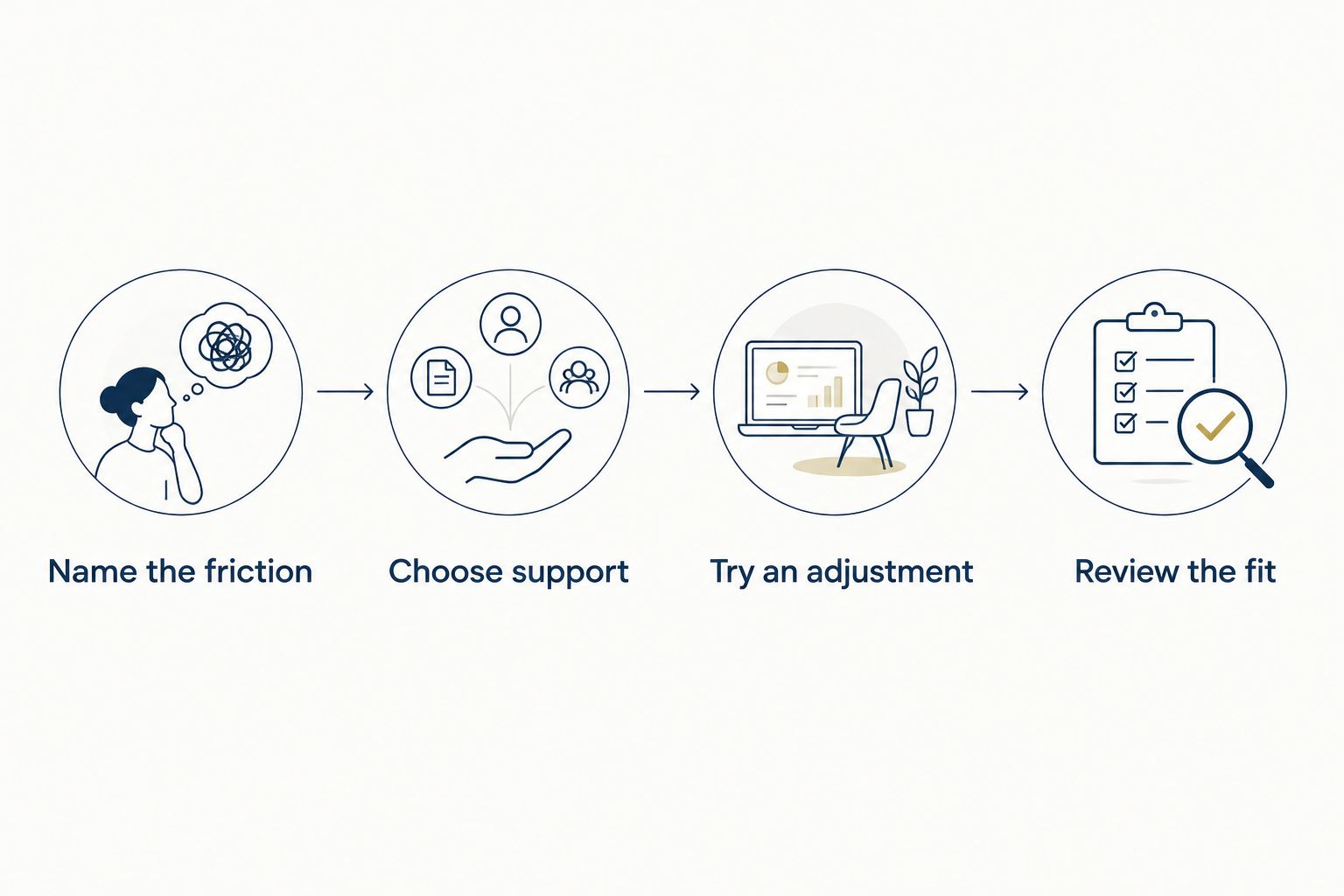
Start with the problem, then choose the tool. Use this sequence to avoid building a system that needs more attention than the routine itself.
Name the friction
Finish this sentence: the hardest part of my evening is remembering to start, knowing what to do, stopping another activity, or adjusting the plan. Choose the answer that describes your experience, not the one you think you should have.
Choose support
Match that answer to a reminder, checklist, timer, journal, or personal coaching. Keep one main place for the plan so you are not checking several tools to find the next step.
Try an adjustment
Choose a small action you can actually attempt. For example, spend 5 minutes preparing tomorrow's essentials, then move into a quieter activity; shorten or replace that example if it does not suit you.
Review the fit
After 7 evenings, look at what was manageable and what kept getting in the way. This is a suggested review point, not a deadline for results. Revise the routine rather than judging yourself.
If you are undecided, begin with a short checklist when you already know your next action. Choose personal guidance when deciding what to change is the harder part. Make room for a rhythm, not a reset button.
If personal support fits your needs, you can create an account and complete a private sleep profile with Restweft. There is no need to arrive with a polished routine.
Make room for your routine
Create an account and complete a private sleep profile to begin with your own evening habits.
FAQ
What's the best bedtime routine app for adults in 2026?
Apple Reminders fits adults who need a starting cue, while Google Keep fits those who want a short checklist. The best choice depends on the task you need help with, not the length of the feature list.
Is Restweft a bedtime routine app?
Restweft is a personal online sleep coaching service, not a standalone bedtime reminder app. It supports practical evening routines, sleep-pattern tracking, and ongoing check-ins, and it is not medical care.
Should I choose a sleep app or personal coaching?
Choose a self-guided app when you know what you want to do and need a reminder or place to record it. Choose personal coaching when you want guidance adapting the routine and discussing what gets in the way.
Can I use a notes app as a sleep journal?
Yes, a notes app can hold a simple sleep journal. Write brief observations about your evening and morning without treating an entry as a diagnosis or proof of what caused a difficult night.
How long should my bedtime routine take?
Choose a length that fits your actual evening rather than treating one duration as correct for everyone. Start with a manageable action and keep a shorter version for nights when your plans change.
Do I need both a checklist and a reminder?
No, you do not need both unless they solve different problems. A reminder prompts you to start; a checklist holds the actions you have chosen.
Can bedtime apps treat a sleep condition?
The reminders, checklists, notes, timers, and wellness coaching discussed here are not medical treatment. Speak with a qualified healthcare professional about persistent sleep difficulties, breathing concerns during sleep, or sleepiness that affects your safety.
One last thing
Write the shorter version of your routine before you need it. If your usual evening includes several actions, decide which single action still feels manageable when plans change.
That small decision gives the app a clearer job. You are choosing support for your evening, not creating another standard to meet.